


New to Document Backup
Hard drive crashes and server failures cost US Businesses over $12 billion a
year. The average company spends between $100,000 and $1,000,000 in total
ramifications per year for desktop-oriented disasters (both hard and soft
costs), according to the statistics.
Backing up important data on a regular basis is probably the easiest way to protect your information from all types of technical disasters.
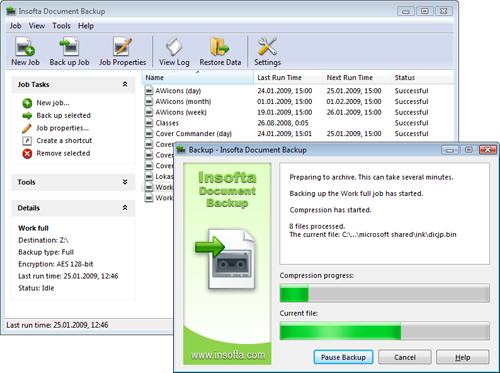
Document Backup is an easy-to-use solution intended to automatically backup your important data to a local or network hard disk, CD, DVD, Blu-Ray or HD-DVD disc or even to an FTP server. Compressed backups (in the zip format) save space and incremental backups save time.
Now Document Backup can handle files that are open by other applications. Even if your files are locked by the operating system and can't be read by a regular backup utility, Document Backup will be able to read and back them up through the VSS subsystem, available in XP and Vista. Read more on Backing up open/locked files.
Thanks to the built-in scheduler, you can stop worrying about the safety of your data. Document Backup makes backups of your data in a fully automatic mode. You can also use any other scheduler to schedule items to be backed up.
The convenient setup wizards of Document Backup make the process of creating backup copies easy even for a beginner, but advanced options are also available.
Main features of Document Backup:
Backing up important data on a regular basis is probably the easiest way to protect your information from all types of technical disasters.
Document Backup is an easy-to-use solution intended to automatically backup your important data to a local or network hard disk, CD, DVD, Blu-Ray or HD-DVD disc or even to an FTP server. Compressed backups (in the zip format) save space and incremental backups save time.
Now Document Backup can handle files that are open by other applications. Even if your files are locked by the operating system and can't be read by a regular backup utility, Document Backup will be able to read and back them up through the VSS subsystem, available in XP and Vista. Read more on Backing up open/locked files.
Thanks to the built-in scheduler, you can stop worrying about the safety of your data. Document Backup makes backups of your data in a fully automatic mode. You can also use any other scheduler to schedule items to be backed up.
The convenient setup wizards of Document Backup make the process of creating backup copies easy even for a beginner, but advanced options are also available.
Main features of Document Backup:
- Backing up open and locked files (XP/Vista only).
- Completely secure backup. Your data will be protected with the most advanced encryption methods.
- Compressing data to the Zip format.
- Backing up to local and network HDD, CD, DVD, Blu-Ray or HD-DVD, FTP.
- Automatically splitting archives to several disks if necessary.
- Incremental backup (only data modified since the last backup will be backed up).
- Powerful and fully customizable scheduler will backup your data completely automatically.
- A system of backup items will allow you to flexibly customize the backup schedule.
- Restore Data Wizard will allow you to restore only the files you select.
- All backup operations are logged.
- Free technical support.



 Introduction
 New to Document Backup
 Getting Started with Document Backup