


Backing up your data to CD, DVD, Blu-Ray, HD-DVD
Backing up data to CD, DVD, Blu-Ray, HD-DVD is probably the safest and most reliable way to
preserve the data. Even if your hard disk crashes, if you have the backup
CD, DVD, Blu-Ray, HD-DVD available, your data will still be recoverable.
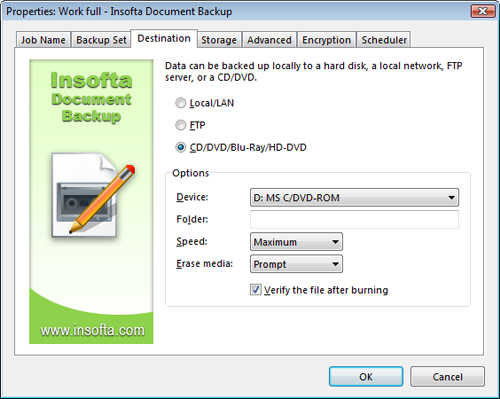
To backup data to CD/DVD/Blu-Ray/HD-DVD folder:
Restoring documents from CD, DVD, Blu-Ray, HD-DVD is as simple as restoring from other locations.
To backup data to CD/DVD/Blu-Ray/HD-DVD folder:
- Select the item and then click the Item Properties button on the
toolbar at the top.
- On the Destination tab, select CD/DVD/Blu-Ray/HD-DVD.
- In the Options group of settings, pull down the Device
menu and then select the CD/DVD/Blu-Ray/HD-DVD drive where you want to burn the backup disc.
- Click on the Folder box and enter the name of the backup folder on the disc.
- Pull down the Speed menu and then select the disc recording speed.
- Click on the Erase Media drop-down list and choose whether the
disk should be erased automatically, never or when you okay that.
- Check whether you want to verify data after backing it up.
- Click OK to apply changes.
Restoring documents from CD, DVD, Blu-Ray, HD-DVD is as simple as restoring from other locations.



 Introduction
 Working with Document Backup
 Managing backup items